Use cases · From data to decisions
Prioritise the improvements
that really matter.
Experience, conversions, accessibility and environmental impact: see how to turn data from your digital services into practical action and measurable results.
Illustrative scenarios. Each use case specifies its scope. Case 1 combines overall experience, bounce rate and priority pages; case 5 uses real usage to prioritise accessibility. On desktop, click a screenshot to enlarge it. Screenshot labels have been translated into English for illustration.
01appYuser
Digital teams · Product
Invest where the experience needs to improve
Your challenge
Your budget is limited. Which pages should you improve first?
How to act
Combine traffic volumes with appYdex: the most-used pages with the poorest experience become your priorities. Then break the data down by device, browser or context.
Overall appYdex: 0.60 · Degraded experience
Which pages should you improve first?
| Page | Hits | Page appYdex |
|---|---|---|
| Frequently visited page | 135,537 | 0.35Degraded |
| Another priority page | 91,226 | 0.42Degraded |
Read the figures and their scope
The overall appYdex is 0.60 for the scope measured from 16 to 22 October 2026, with 233,836 sessions. Bounce rates are 75.2% for degraded experiences, 58.5% for neutral experiences and 51.5% for enhanced experiences. This observed relationship does not, on its own, establish causation. The frequently visited page has 135,537 hits and an appYdex of 0.35; the other priority page has 91,226 hits and an appYdex of 0.42. The overall score covers the full scope, beyond these two pages. Hits and sessions are different measures. appYdex is calculated from full page loads; the experience breakdown and bounce rates are analysed at session level. The overall score cannot be inferred from session shares alone.
02appYuser
Marketing · Acquisition · Online services
Link optimisation to conversions
Your challenge
You want more purchases, registrations or enquiries. Where should you act?
How to act
Compare timings for sessions that convert with those that do not. Set a target, test an optimisation and measure its effect on comparable groups.
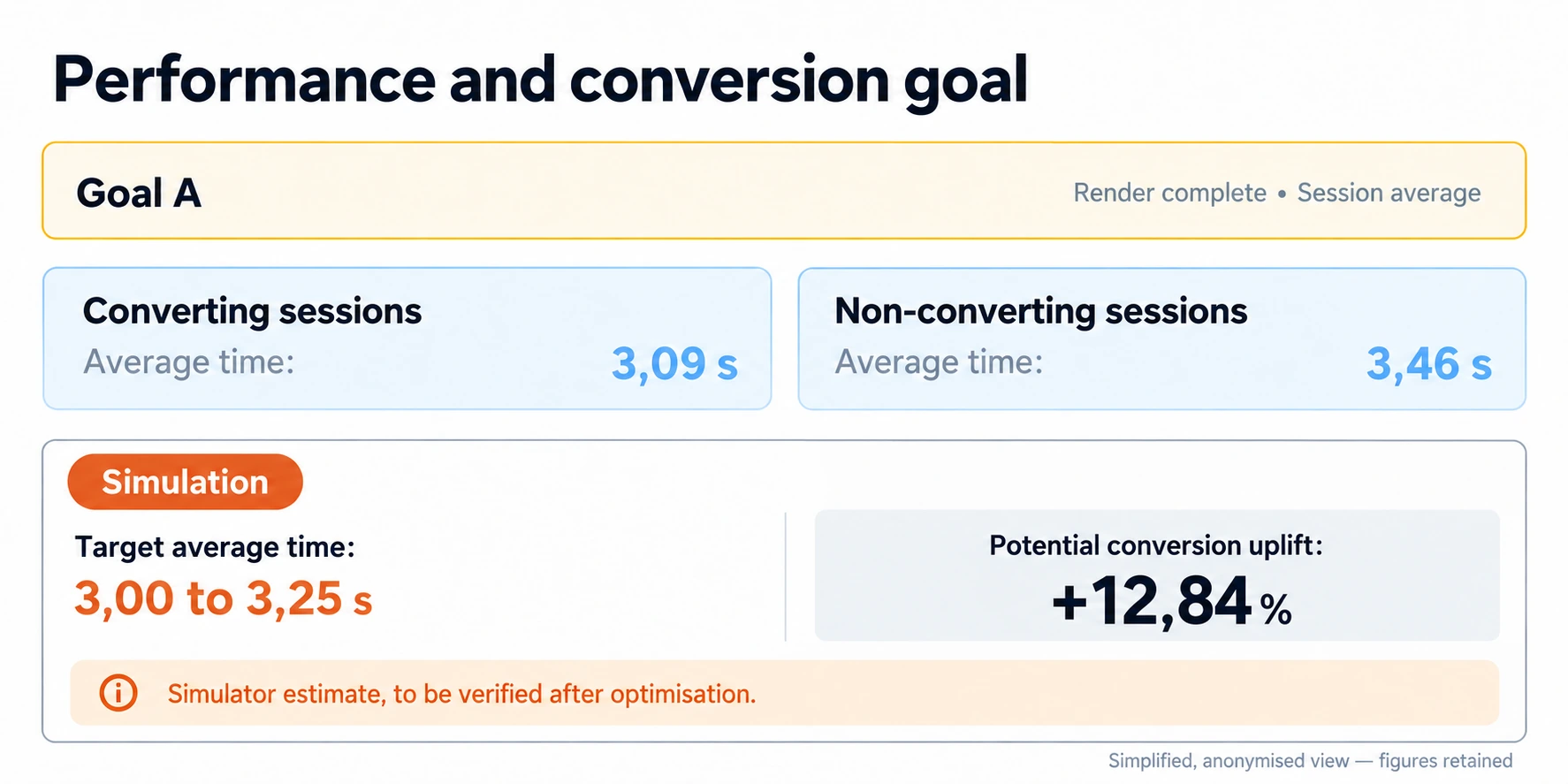
+12.84% · Simulated potential
Read the figures and their scope
The average end-of-rendering time is 3.09 s for sessions that converted, compared with 3.46 s for those that did not. The simulator estimates a potential uplift of 12.84% for a target of 3.00–3.25 s. This is an estimate, with no guaranteed gain: the groups are not a before-and-after comparison.
03appYuser
IT leadership · Operations
Spot deteriorating experience over time
Your challenge
Has a production release made the experience worse for your visitors?
How to act
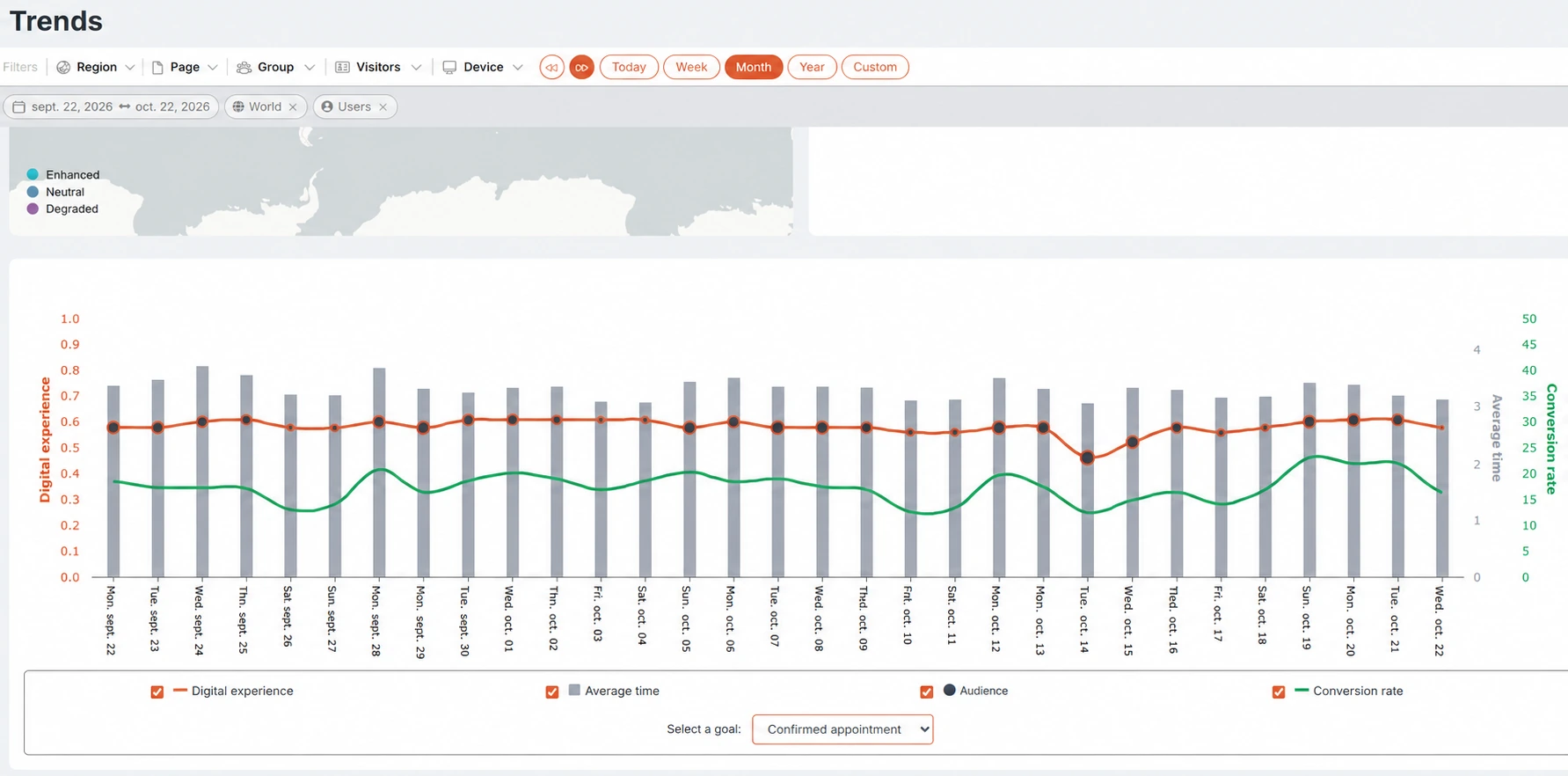
Track appYdex alongside timings, traffic and conversions. Identify when technical changes took place, then check that experience returns to the expected level after a fix.
A shared history
Read the figures and their scope
The experience curve dips around 14 October. The other indicators provide context before you investigate the cause. Each series uses its own scale.
04appYuser
Technical teams · Development
Bring in the right technical teams
Your challenge
A page is slow. Should you start with the server, the network or rendering?
How to act
Break down the timings observed in real use. Investigate the largest contributors, then relate the diagnosis to user experience and business goals.
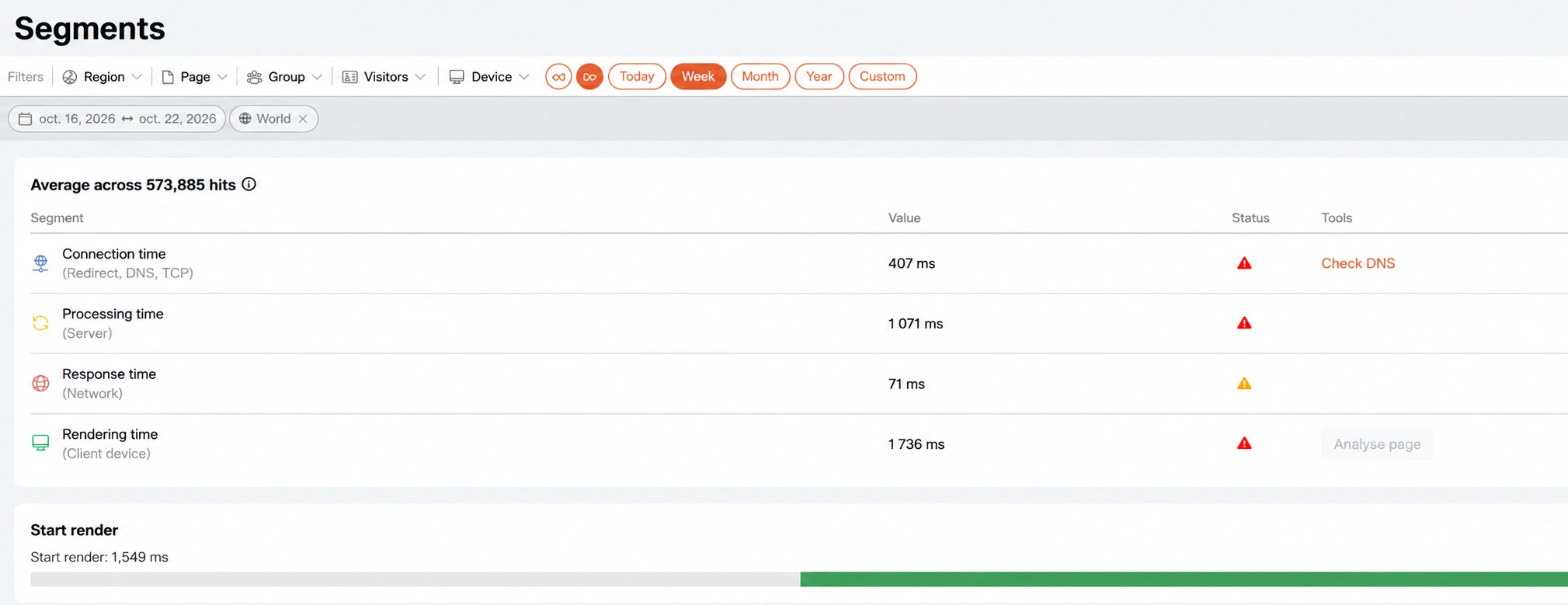
1,736 ms · Client-side rendering
Read the figures and their scope
Across 573,885 hits: connection 407 ms, server processing 1,071 ms, network response 71 ms and client-side rendering 1,736 ms. Start of rendering is 1,549 ms. These indicators describe different stages.
05appYaccess + appYuser
Accessibility lead · Digital teams · IT leadership
Assess more thoroughly, in less time
Your challenge
How can you cover RGAA criteria reliably, reduce checking time and prioritise the difficulties your users actually encounter?
How to act
Use real usage and experience data to select a representative scope. Assess all applicable criteria, automate a large proportion of checks and complete those that require human expertise.
RGAA coverage · Time savings · Real experiences
Comprehensive checks, guided by real usage
Identify the situations your users encounter to select a representative scope and prioritise fixes.
Cover all 13 RGAA themes by combining automated checks with expert assessment.
Automate a large proportion of checks and rerun analyses to detect regressions.
Understand the approach
Selection starts with real usage and is complemented by the essential functions, content, components and states to be assessed. Automated checks are combined with the human assessment needed to cover applicable criteria. The experience indicator helps prioritise investigations; it is not an RGAA compliance rate.
06appYaccess
Accessibility lead · QA · Agency
Rerun checks after a change
Your challenge
How can you verify fixes without repeating every check manually?
How to act
Monitor all 13 RGAA themes in one view. Automate objective checks, complete the necessary human assessments and rerun analyses after each change.
13 themes · One monitoring view
Monitor all 13 RGAA themes
Demonstration example · Simulated data.
| Theme | Check progress | Assessed score |
|---|---|---|
| 1Images | 71% | 41.7% |
| 2Frames | 100% | 100% |
| 3Colours | 67% | 61.9% |
| 4Multimedia | 45% | 50% |
| 5Tables | 83% | 80% |
| 6Links | 30% | 100% |
| 7Scripts | 62% | 37.5% |
| 8Mandatory elements | 92% | 88.9% |
| 9Information structure | 78% | 75% |
| 10Presentation of information | 68% | 54.5% |
| 11Forms | 85% | 66.7% |
| 12Navigation | 90% | 62.5% |
| 13Consultation | 58% | 42.9% |
Read the figures and their scope
The values in this table are simulated to illustrate different situations across all 13 themes. Progress shows how far the checks have advanced; the score reflects the results assessed so far. For example, Links shows a 100% score with only 30% progress: this does not mean that all checks are complete. These figures are neither real audit results nor an overall site compliance rate.
07appYplanet
Sustainability · Digital teams
Track environmental impact on a consistent basis
Your challenge
How can you understand changes in your footprint and track ecodesign action?
How to act
Use the European PEF method and a view across all 16 impact categories. Analyse real usage and its contexts, then compare periods using a consistent scope and assumptions.
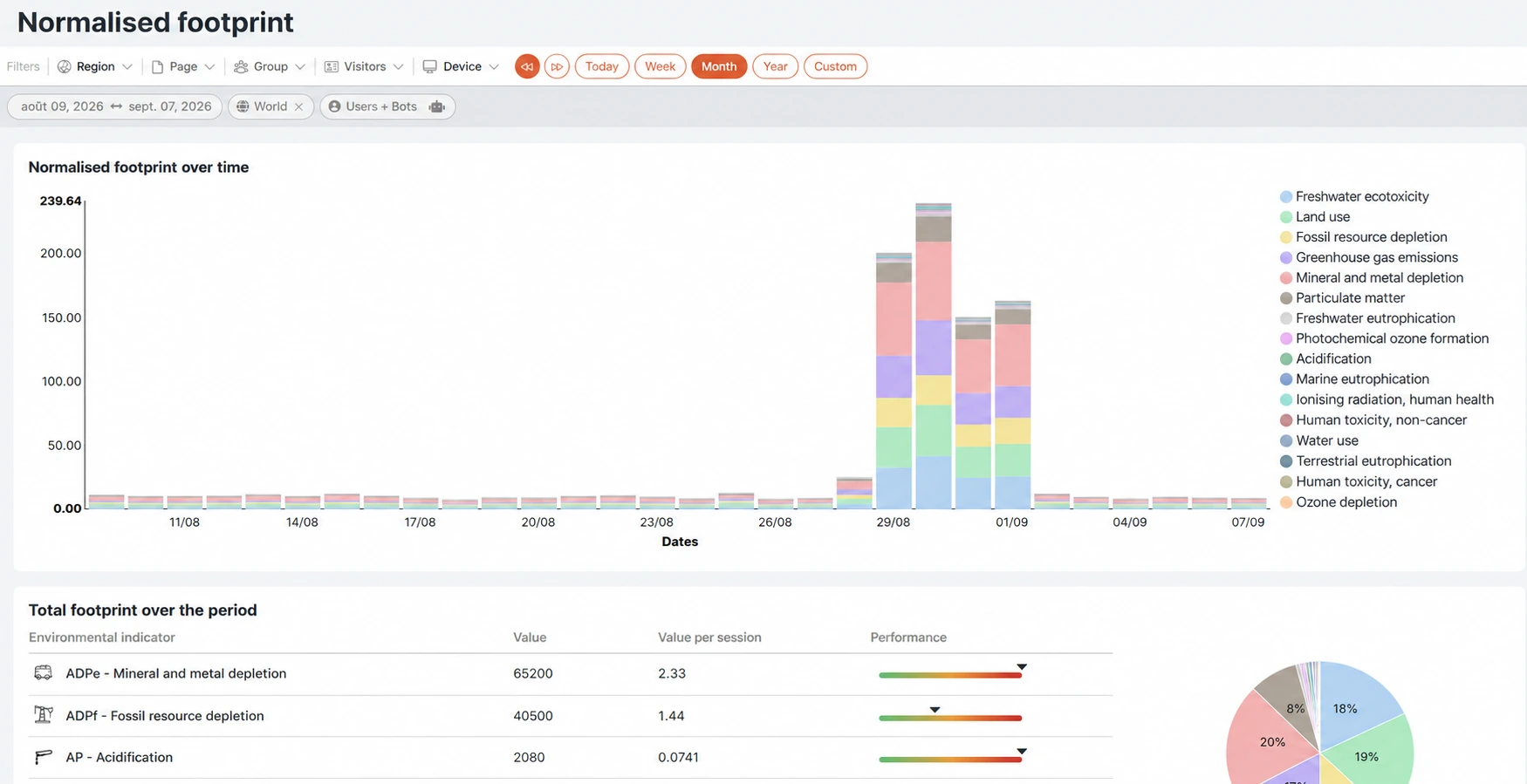
16 impact categories
Read the figures and their scope
A rise is visible from 29 August to 1 September. Several categories contribute, including greenhouse gas emissions, mineral and metal resource depletion, and freshwater ecotoxicity. Check traffic, bots, pages and technical changes before drawing conclusions.
Methodological references: ADEME’s product category rules for digital services and the GreenIT.fr web ecodesign framework.
08appYplanet
Sustainability · IT leadership · Ecodesign
Target your ecodesign efforts
Your challenge
Your budget is limited. Which areas should you investigate first?
How to act
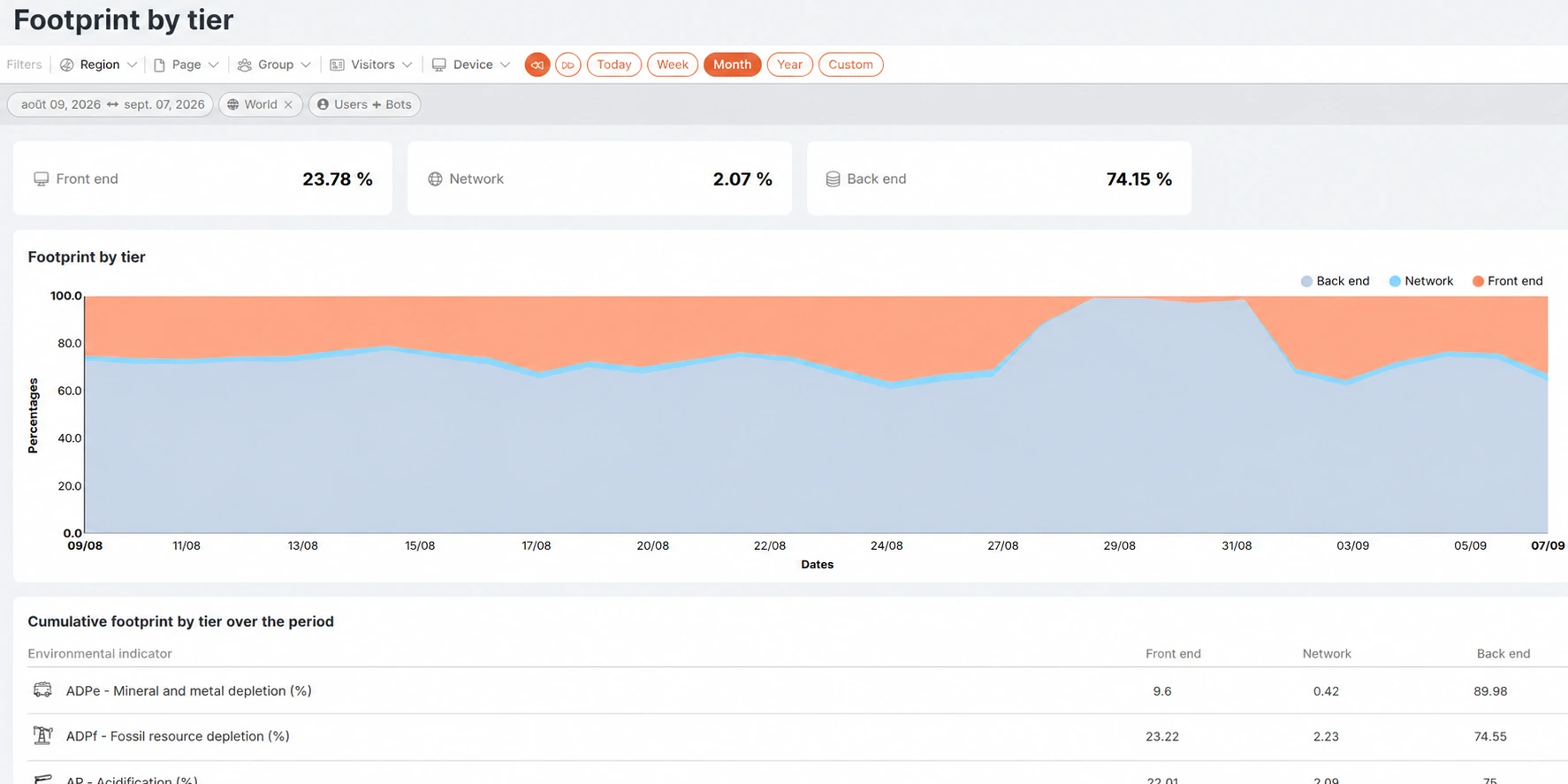
Identify the contributions of the back end, front end and network. Investigate the largest contributors, test an approach and then track impact, experience, conversions and accessibility.
74.15% · Back-end contribution
Read the figures and their scope
The view attributes 74.15% to the back end, 23.78% to the front end and 2.07% to the network. These relative shares are not achievable reductions. The PEF simulator lets you explore assumptions before checking their effect against real usage.
Start with your priority journey.
Tell us your objective: we will show you the indicators, checks and monitoring that fit your context.